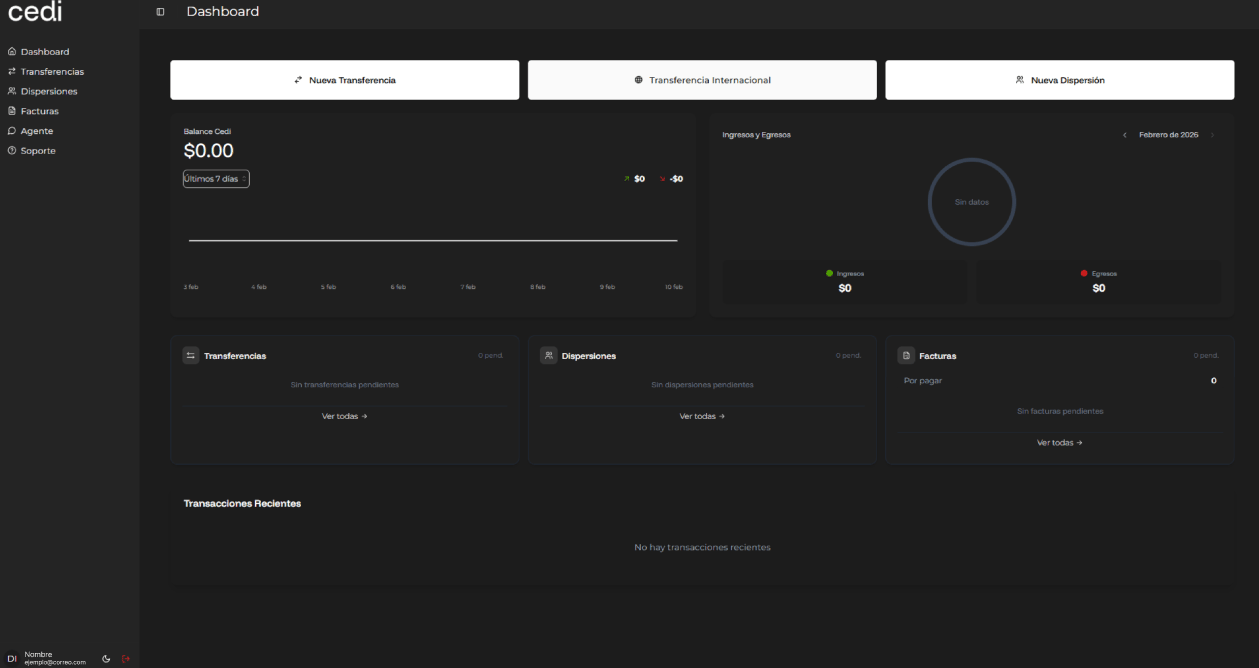
The system also displays a summary of the main sections. In the Transfers section, the user can view pending operations and, by selecting “View all”, is directed to the complete transfers section. Similarly, in the Payouts section, pending payouts are shown with the option to view the full list via “View all”. Likewise, in the Invoices section, the user can view pending invoices and access the complete billing section. In the Recent transactions section, the system displays a list of the latest operations performed. If transactions exist, they are displayed on screen; otherwise, the message “No recent transactions” is shown.
The side menu enables navigation across the different system modules, including Dashboard, Treasury, Payouts, Cards, Accounting, Agents, and Support. Selecting any of these options redirects the user to the corresponding section. In the bottom left corner, the system displays the user profile (name and email), along with options to switch the visual theme between light and dark mode, as well as the option to log out. It is important to note that, before performing any operation, the user must access their profile and activate two-factor authentication (2FA).