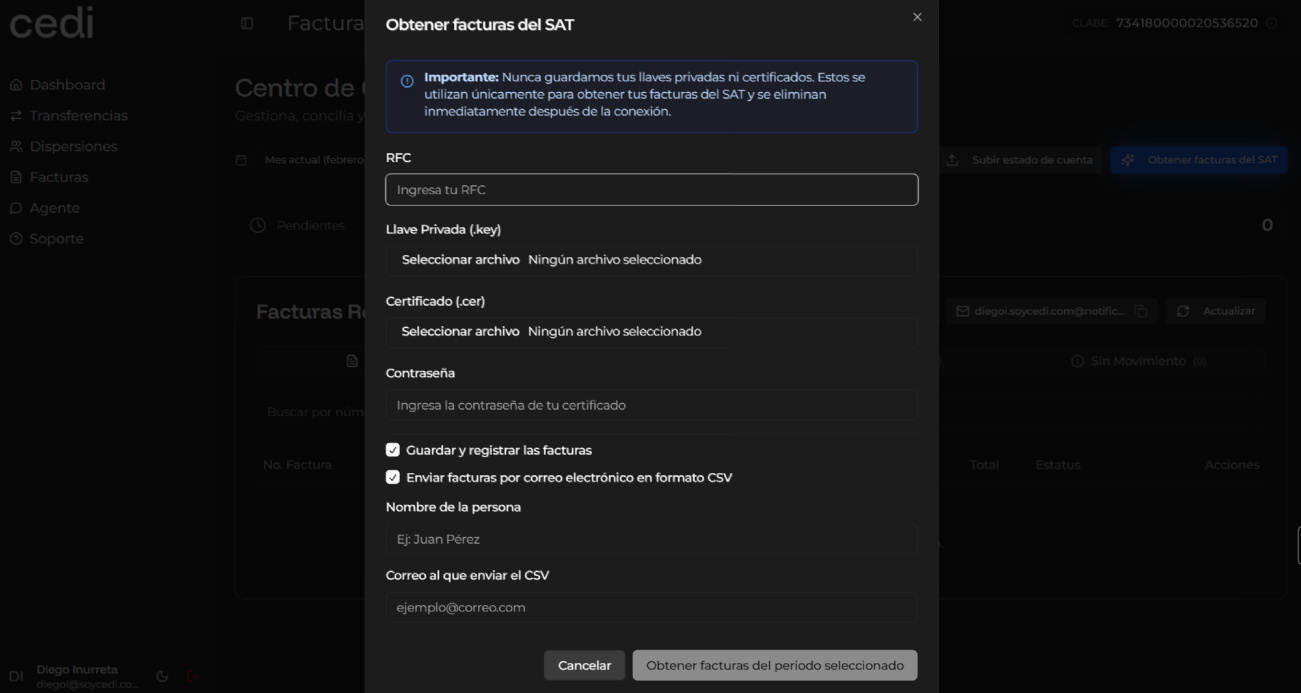
To obtain invoices directly from the Tax Administration Service (SAT), you must select the “Obtain invoices from the SAT” option. The system displays a form where the necessary data is requested to establish a secure connection with the SAT platform.The required data includes:
RFC
Private key (.key)
Certificate (.cer)
Certificate password
The system informs that the provided files and credentials are used only to obtain the corresponding invoices and that they are automatically deleted at the end of the process, guaranteeing the security of the information.You can select the following additional options according to your needs:
Save and register the invoices in the system
Send invoices by email in CSV format
If you activate the email sending option, the system will request the following information:
Recipient name
Email address
Once the data has been completed, you must select the “Obtain invoices” option corresponding to the desired period.The system connects to the SAT, downloads the invoices corresponding to the indicated period, and automatically registers them within the system.Finally, the system displays a confirmation message indicating that the invoices were successfully obtained and updates the list of registered invoices, allowing you to view the new invoices within the platform.Important: We never store your private keys or certificates. These are used only to obtain your invoices from the SAT and are deleted immediately after the connection.
Assistant
Responses are generated using AI and may contain mistakes.